Frozen Viking Warrior AIMorph your selfie into a frosted battle-axe Viking
Browse free10 credits (480p) · 20 credits (720p)
Upload one chest-up portrait to transform your modern subject inside an office or home frame into a frostbitten battle-axe Viking as swirling blizzard snow hits. Use a sharp front-facing headshot with unobstructed eyes and eyewear frames so the end-frame warrior edit keeps exact facial structure and glasses intact. Browsing and choosing options are free; generating one video requires a registered MakeHit account and costs 10 credits at 480p or 20 credits at 720p.
1 portrait photo 8 s · Audio on 9:16 · TikTok/Reels No watermark
Make your Frozen Viking Warrior AI video
1Upload photos
Portrait photo required
Use your own photo or a consenting adult’s. No photos of other minors or public figures.
2Choose video quality
8 sec · 9:16
By generating you confirm you have permission to use the people in your photos. Terms · Privacy
Private job and result · 10 credits · 480p · 20 credits · 720p
THE RESULT
What the Frozen Viking Warrior AI video looks like
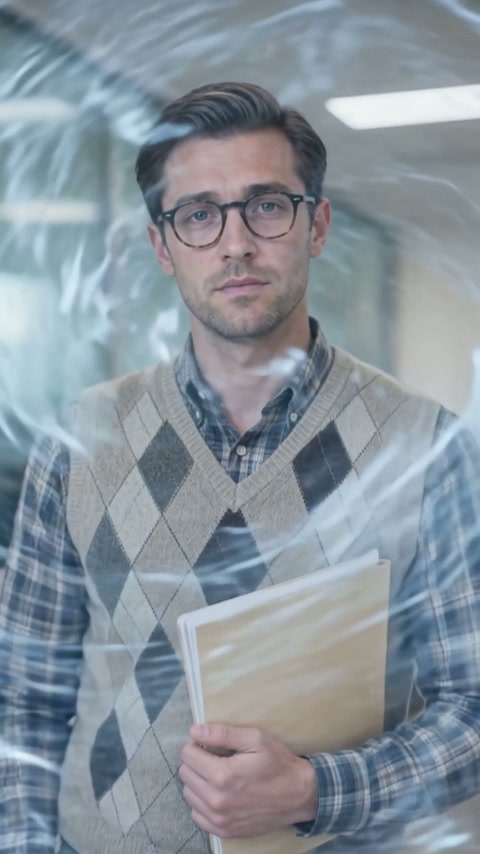
Watch an 8-second vertical MakeHit render morph an office accountant in tortoise glasses and argyle vest into a frost-covered Nordic Viking warrior.
Argyle-vest accountant morphs into a battle-axe Viking
9:168sAAC audio
Opens directly on the uploaded office portrait and cardboard folder before frost hits
Round tortoise glasses and exact facial structure remain cleanly intact after armor morph
Clean 8-second Norse war-drum audio and vertical 9:16 borders with zero watermarks
Portrait photo
Created with MakeHit using one portrait of a meek office accountant wearing round tortoise glasses and a beige argyle vest.
THREE STEPS
How to make a Frozen Viking Warrior AI video
Follow three browser steps to render your 8-second Viking transformation MP4.
01
Upload one Portrait photo
Choose a crisp JPG, PNG, WebP, or HEIC chest-up photo under 10 MB showing clear eyes, hair, and any glasses.
02
Pick quality & confirm
Choose 480p (10 credits) for quick morph tests or HD 720p (20 credits) for sharp frost and steel detail.
03
Download & post
Play the 8-second video unmuted to confirm facial features and glasses survive the blizzard before downloading to post manually.
PHOTO GUIDE
Which photo works best?
Frozen Viking Warrior AI
Input & role order
Upload one chest-up front portrait into the Portrait photo slot.
Compose the shot
Full face, sharp eyes, natural hair color, and any eyeglasses worn cleanly without glare.
Avoid
Dark sunglasses, heavy beauty filters, extreme side profiles, or hands covering cheeks.
Every upload
Upload a single JPG, PNG, WebP, or HEIC portrait under 10 MB with clear head and shoulder framing.
Everyday indoor clothes or office attire create the funniest contrast against Nordic fur armor.
ORIGIN
Where the Frozen Viking warrior AI trend came from
Its signature chanting track actually comes from 'Kure Kure' ('Far, far away'), a Shona song @imnomagugusibanda shared on May 21, 2026 (1.3M plays, growing to 320.8K videos as listeners translated the Zimbabwean lyrics in 1,569 comments). On June 4, @cool77809 paired that sound with a nine-language Gemini AI and CapCut warrior guide (186.9K plays), before November #vikingfilter posts from @user6146384046736 (488.8K plays) and @nichobmi3d8 (336.3K) packed comments with 'help me to do this' requests.
Commenters celebrate the Zimbabwean Shona track ('This should be Zimbabwean National Anthem', 1,173 likes) and translate 'Kure Kure' ('Far, far away') as the audio grows to 320.8K TikTok videos. TikTok · @imnomagugusibanda
@cool77809 posts nine-language Gemini & CapCut guide to 186.9K plays
Pairing the chanting beat with blizzard warrior edits pulls 10.8K shares and 696 comments such as 'je veux du même' asking for the preset. TikTok · @cool77809
French and English Hypic/Godpic tutorials spike through mid-November (plus 314.9K plays on Nov 16), drawing comments like 'help me to do this' and 'quero fazer isso mesmo'. TikTok · @user6146384046736
MakeHit builds the frosted Viking keyframe and animates the blizzard transition automatically from one photo. Copy this standalone text-to-video prompt if testing general models manually.
Frozen Viking Warrior AIPortrait photo
Vertical 9:16 cinematic transformation from a fluorescent-lit modern office into a windswept jagged Nordic mountain peak. 0.0-2.5s: A meek accountant wearing round tortoise glasses, parted brown hair, and a beige argyle sweater vest clutches a cardboard folder nervously while cold blue frost begins creeping across the frame. 2.5-5.5s: Heavy swirling blizzard snow whips across the lens during a smooth push-in as his sweater vest and folder morph seamlessly into weathered steel shoulder armor, leather straps, and a thick snow-dusted brown wolf-fur cloak while keeping his exact face and tortoise glasses intact. 5.5-8.0s: Standing tall with subtle cold frostbite war-paint scratches on his cheek, the frosted warrior hoists a heavy rune-carved Nordic battle axe against his chest under epic steel-blue storm light with crisp photographic detail and zero watermarks.
CREDITS
How many credits does Frozen Viking Warrior AI cost?
10 credits for standard 480p or 20 credits for HD 720p.
480p10 credits9:16 · 8s · Fast preview MP4 testing face and glasses retention through the blizzard morph.
720p20 credits9:16 · 8s · Crisp HD export highlighting wolf-fur texture, frost scratches, and steel armor engravings.
Browsing examples, inspecting photo rules, and selecting quality tiers cost zero credits. Credits are held on submission and deducted only once the finished MP4 completes. Failed jobs automatically return spent credits to your MakeHit account balance. Pay per credit pack with no subscription requirement.
BREAKDOWN
Frozen Viking Warrior AI, second by second
Seamless 8-second morph from modern indoor frame to blizzard cliff finale.
Time
Beat
What should happen
0.0-2.0s
Modern portrait opener
Video starts inside the real uploaded portrait scene before cold mist drifts across the foreground.Confirm opening face, outfit, and room match your source image cleanly.
2.0-4.5s
Blizzard sweep & armor morph
Swirling arctic snow whips across the frame while everyday clothes transition into wolf fur, leather straps, and steel plates.Check that eyeglasses and eye shape remain locked instead of blurring away.
4.5-6.5s
Battle-axe hoist
The frosted warrior grips a rune-carved Nordic battle axe across the chest on the heavy war-drum drop.Confirm fingers wrap naturally around the axe handle without extra digits.
6.5-8.0s
Snowy cliff hold
Cold steel-blue storm light illuminates frostbite cheek scratches and fur collar through the final second.Verify unmuted war-drum audio and clean vertical borders.
VERSIONS
Which Frozen Viking Warrior AI version should you use?
Frozen Viking Warrior AI · 480p / 720p
BEST FORPick 480p (10 credits) to test expression contrast, or 720p (20 credits) for sharp snowflake and steel detail.
Fixed 8s 9:16 end-frame guided blizzard morph with synced audio and no watermarks.
TROUBLESHOOTING
Common Frozen Viking Warrior AI problems & fixes
Keep glasses intact and prevent generic warrior faces by avoiding heavy glare, sunglasses, or side profiles.
Problem
Likely cause
What to change
Eyeglasses vanish or warp mid-blizzard
Strong white monitor reflection hid the eyeglass rims in the source portrait.
Retake the portrait facing soft even light with crisp visible frames before running again.
Warrior face drifts away from original person
Side-turned or shadowy selfie hid bone structure and eye spacing.
Use a sharp front-facing chest-up portrait rather than retrying angled shots.
Hands holding the battle axe look distorted
Tight chin crop left no chest or arm context for the armor transition.
Upload a chest-up photo with visible shoulders and torso.
Blizzard transition looks static like a slideshow
Input file was a heavily filtered or low-resolution social screenshot.
Use an unfiltered original JPG, PNG, WebP, or HEIC under 10 MB.