GTA 5 Goodbye Highway AIDrive a retro sunset highway farewell past biking friends
Browse free10 credits (480p) · 20 credits (720p)
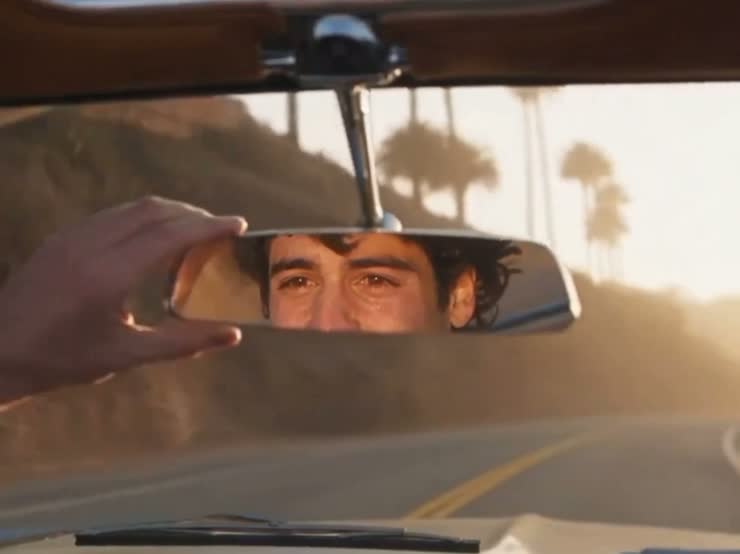
Turn one clear photo into the convertible driver catching sight of friends in the rearview mirror, saluting a passing biker and red jeep, and wiping away a golden-hour tear. Choose an uncovered frontal portrait with crisp eyes so the tight rearview mirror opener matches the closing golden-hour smile. Browsing and choosing options are free; generating one video requires a registered MakeHit account and costs 10 credits at 480p or 20 credits at 720p.
1 clear photo 15.0 s · Audio on 4:3 · TikTok/Reels No watermark
Make your GTA 5 Goodbye Highway AI video
1Upload photos
Your photo required
Use your own photo or a consenting adult’s. No photos of other minors or public figures.
2Choose video quality
15 sec · 4:3
By generating you confirm you have permission to use the people in your photos. Terms · Privacy
Private job and result · 10 credits · 480p · 20 credits · 720p
THE RESULT
What the GTA 5 Goodbye Highway AI video looks like
Watch our tested MakeHit example running 15.0s in native 4:3 with synchronized sound.
GTA 5 Goodbye Highway AI
4:315.0sAAC audio
Full 15.0s duration matches original scene pacing
Native 4:3 frame without unwanted crop bars
Distinct likeness held on Your photo
Synced AAC audio non-silent and watermark-free
Your photo
Generated with MakeHit using AI test portraits.
THREE STEPS
How to make a GTA 5 Goodbye Highway AI video
Upload one eye-clear portrait, choose quality, and check both mirror opener and final tear wipe.
01
Upload one eye-clear frontal portrait
Drop a bright portrait showing unobstructed eyes and eyebrows so mirror close-ups hold expression after consent.
02
Pick 480p or HD 720p
Use 480p (10 credits) for quick previews or HD 720p (20 credits) for release clarity.
03
Download & post
Review the 0.0s rearview mirror opener and 13.8s coastal sunset tear wipe in native 4:3 with music enabled, then download and post manually.
PHOTO GUIDE
Which photo works best?
GTA 5 Goodbye Highway AI
Input & role order
One front-facing portrait with expressive eyes so the rearview mirror and final smile connect.
Compose the shot
Clear eyes and open face without dark sunglasses or bangs covering eyebrows.
Avoid
Harsh backlighting or extreme low-res avatars.
Every upload
Use crisp JPG, PNG, WebP, or HEIC files under 10 MB each.
Keep lighting even so face holds steady through all 5 cuts.
ORIGIN
Where the GTA 5 desert highway farewell trend came from
Borrowing the split-highway parting shot from Furious 7's "See You Again," players turned GTA V's desert roads into a send-off ahead of GTA VI's November 19, 2026 release. On November 16, @realconner drove "A final farewell 😢" to 4.4M plays and 583.7K likes—alongside @alexander__lyrics edits and @zarki_34's "One Last Drive" convoys—leaving fans torn between "the end of an era..." and "Mfs acting like gta v is getting deleted."
"See You Again" popularizes the split-highway farewell
Wiz Khalifa and Charlie Puth's Furious 7 tribute cements the side-by-side desert road fork as gaming and car culture's shorthand for saying goodbye. Public source · en.wikipedia.org
@allabout0106 kicks off pre-launch highway goodbyes
Drawing 447.2K plays and 6,641 shares, early November edits pair Grand Theft Auto V road trips with nostalgic captions as @zarki_34 organizes "One Last Drive" GTA Online convoys. TikTok · @allabout0106
@realconner hits 4.4M plays with "A final farewell 😢"
The 583.7K-like clip turns "the end of an era..." into a shared gamer roast-and-nostalgia thread as 6,132 commenters debate whether anyone is really uninstalling Los Santos. TikTok · @realconner
"Midnight City by M83 SLOWED" anchors 12.9K edits
Alongside "See You Again" tributes and @alexander__lyrics edits, the slowed synth track powers 12.9K farewell and night-drive clips ahead of GTA VI's November 19 debut. Public source · tiktok.com
Dates, view counts, and reactions come from Wikipedia's song entry and the cited public TikTok posts and sound page.
Full cultural timeline, creator variants & audio rights:
MakeHit handles multi-cut timing inside the app. Use this standalone text-to-video guide if testing external scene generation.
GTA 5 Goodbye Highway AIYour photo
Retro 4:3 sunlit desert highway goodbye sequence in warm golden-hour cinematic tone. 0-3.2s: Rearview mirror reflection reveals driver eyes as a hand tilts the mirror toward a motorcyclist behind. 3.2-6.4s: Biker salutes farewell as the driver glances left. 6.4-13.8s: Neighboring black car friend waves and over-the-shoulder POV pulls past a red jeep with passengers cheering. 13.8-15.0s: Warm sunset close-up as driver wipes a tear and smiles.
CREDITS
How many credits does GTA 5 Goodbye Highway AI cost?
480p costs 10 credits; HD 720p costs 20 credits.
480p10 credits4:3 · 15.0s · Fast preview MP4 with synchronized AAC audio.
720p20 credits4:3 · 15.0s · High-definition MP4 with sharper facial and scenic detail.
Browsing presets, inspecting examples, and selecting slots are free. Credits are held on start and settled only on completion. Failed jobs automatically return held credits back to your balance. Zero recurring lock-in required for one-off credit packs.
BREAKDOWN
GTA 5 Goodbye Highway AI, second by second
Follow the 5 timed beats synced to the audio track.
Time
Beat
What should happen
0.0-3.2s
Rearview mirror check
Opening mirror reflection frames the driver's eyes before tilting onto a pursuing motorcyclist.Check sharp facial alignment and clean cut transition.
3.2-6.4s
Biker farewell salute
Motorcyclist salutes from the asphalt as side camera tracks the vintage convertible.Check sharp facial alignment and clean cut transition.
6.4-10.8s
Sedan & highway POV
Black sedan driver waves goodbye before over-the-shoulder POV glides up behind a red jeep.Check sharp facial alignment and clean cut transition.
10.8-13.8s
Red jeep send-off
Red jeep passenger leans into sunset wind waving both arms across the desert lane.Check sharp facial alignment and clean cut transition.
13.8-15.0s
Golden-hour tear wipe
Driver smiles fondly and wipes a single tear beneath warm coastal sunset rays.Check sharp facial alignment and clean cut transition.
VERSIONS
Which GTA 5 Goodbye Highway AI version should you use?
GTA 5 Goodbye Highway AI · 480p / 720p
BEST FOR480p for fast casting checks; 720p for crisp final exports.
Original 4:3 scene preserving soundtrack with 10-credit 480p or 20-credit 720p output.
TROUBLESHOOTING
Common GTA 5 Goodbye Highway AI problems & fixes
How to avoid harsh backlighting or extreme low-res avatars. and verify output smoothly.
Problem
Likely cause
What to change
Eyes inside the opening rearview mirror look generic or washed out
Sunglasses, thick bangs, or heavily backlit selfies hide eye contact in the tight mirror reflection opener
Use a front-facing daylight portrait showing both eyes clearly so the mirror glance matches the closing tear smile.
Rearview mirror frame cuts off eyebrows or upper hairline
Tightly zoomed square selfie lacks forehead margin in the 0.0s mirror crop
Provide an uncropped head-and-shoulders portrait with breathing room above hair.
Aviator shades hide emotion in the 13.8s tear-wipe close-up
Sunglasses or heavy brim shadows obscure eyes needed for the nostalgic smile
Resubmit an indoor or bright daylight portrait with bare eyes clearly visible.
Golden sunset wash over-brightens pale indoor selfies
Harsh overhead backlight clips skin highlights along the convertible door
Pick an evenly exposed portrait with balanced facial contrast.